Send professional invoices in seconds, see your GST return figures box by box, and prepare your staff pay. Everything stays on your own computer, phone or tablet.
Three jobs that eat time every month. JBM takes the sums out of each one.
Typing them up in Word or Excel, then keeping track of the numbers.
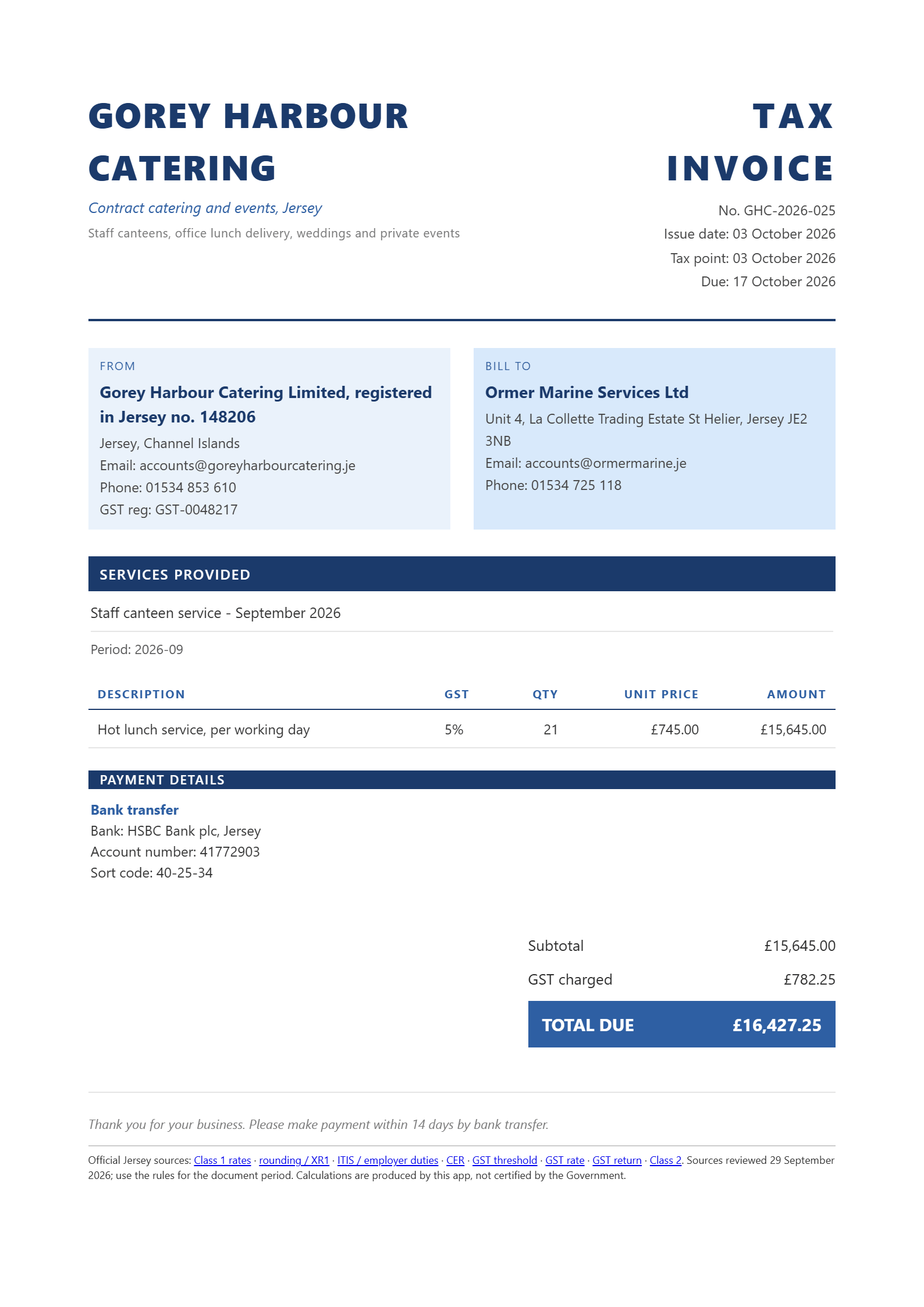
Numbered, dated and ready to send as a PDF.
Quarter end, and you are adding up receipts by hand.
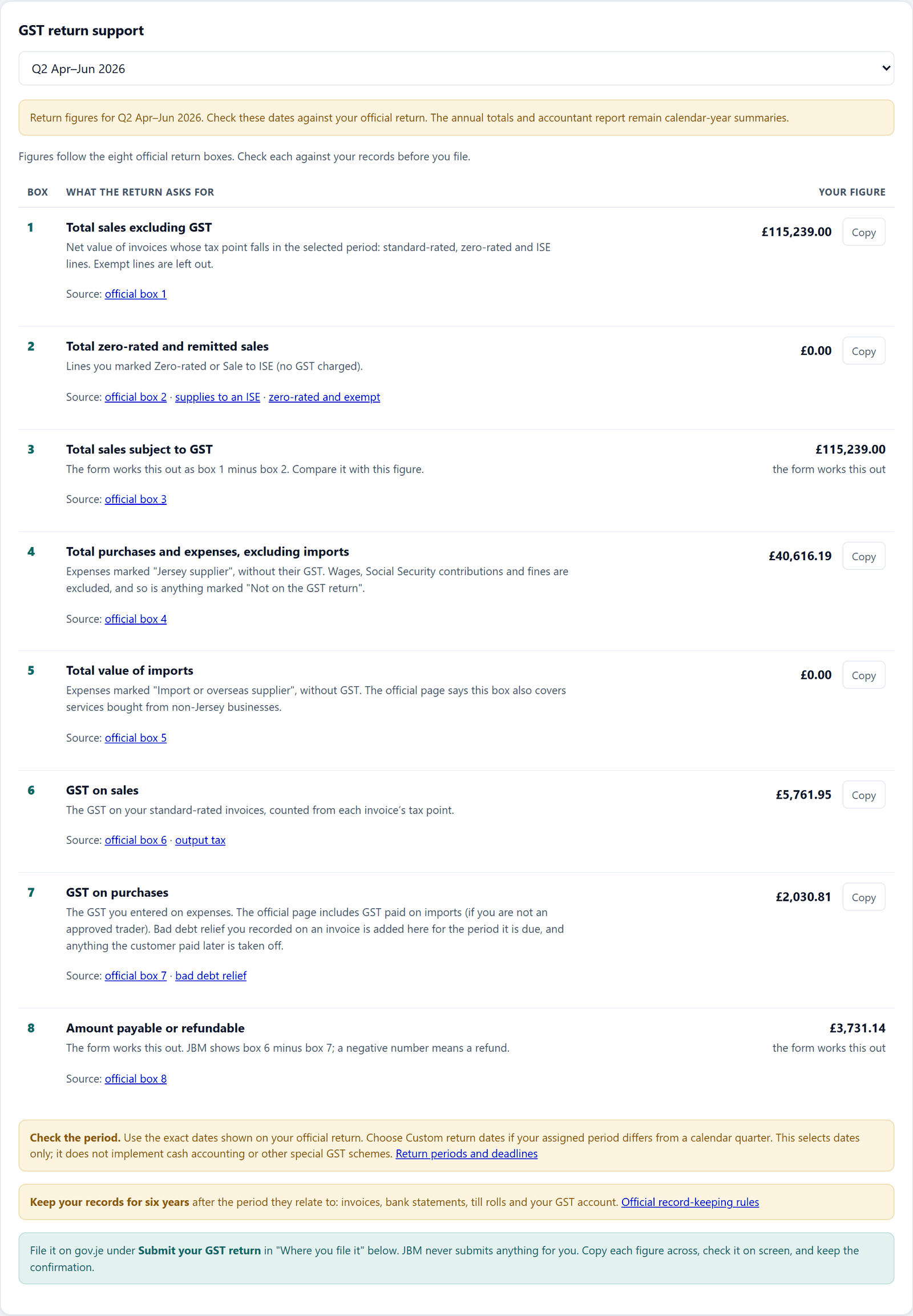
Your eight return boxes are worked out from what you recorded, with the gov.je page beside each.
ITIS and contributions to work out before the 15th, every month.
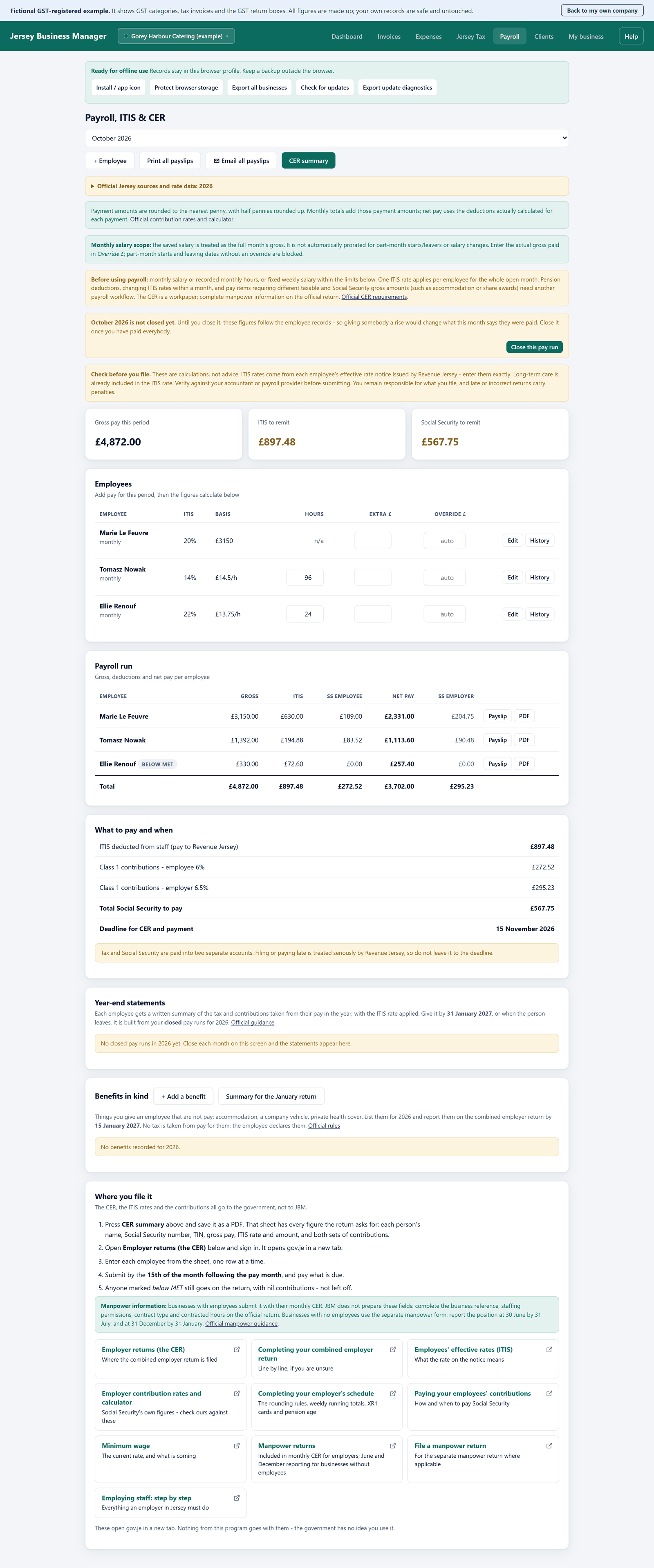
Enter each employee's current ITIS rate and update it when Revenue Jersey sends a new notice. JBM does the sums and prints the payslips.
Your details, your numbering, your due dates. Print it or save it as a PDF from your browser.

Record each sale and expense once. JBM adds up the eight boxes of the return for you.

Check each employee's ITIS rate, run the month, and hand out the payslips.

Ninety days is long enough to try a full quarter of invoices and GST figures before you decide. No card, no account, and nothing is deleted if the trial ends.
Start my free 90 daysOpen the install page in a supported browser and follow the instructions for your device.
Choose Create desktop shortcut when offered. Reopen JBM from its desktop icon or the Windows Start menu.
Wait for “Ready for offline use”, then try the listed supported workflows with test data. A matching result in one case does not validate every pay pattern or tax situation.
Use the request form, before or after the trial ends. Orders and signed licence codes are handled by email: you get a written order confirmation before paying. No online checkout, no automatic renewal.
Annual licence, paid manually by written order; no automatic renewal. Renewal includes access to current releases; check the release notes for the rates, rules and effective dates included. Before payment, request the written order confirmation showing seller contact details, total including applicable taxes, 365-day term, delivery and cancellation information.
For sole traders and small service businesses in Jersey that invoice customers, record expenses and work mainly from one computer. Check your actual transactions and pay arrangements before buying.
Record standard-rated, zero-rated, ISE and exempt invoice lines and classified expenses; select your official return dates.
You determine each transaction's treatment. Exempt sales may require a manual input-tax adjustment that JBM does not calculate.
JBM prepares payroll figures; manpower fields are completed on the official return.
It does not file or pay anything.
Each browser profile and device has separate local records, with no automatic synchronisation.
Protect your computer and regularly export backups to a separate safe location; use Import to restore them or move to another device.
Try your actual workflow during the free 90 days before buying.
GST: you choose the category, JBM adds it up. Tell JBM the category of each sale and the GST treatment of each expense, and it works out the eight boxes of the return for you. Bad debt relief and the exempt sales check follow the rules on gov.je. For services bought from overseas it points you to the official page. The registration indicator is only a guide.
You submit your own returns. JBM prepares the figures. You check them against your records and file on the official site.
Read our plain-English guide to starting as a sole trader: business licence, Class 2, data protection and GST, with the official link and a checklist at every step.
Jersey Business Manager (JBM) is a program for Jersey businesses that makes GST invoices, records sales and expenses, works out the figures for the GST return box by box, and prepares staff pay with ITIS and Class 1 contributions. It runs on your own computer, nothing you enter is uploaded, and it does not file anything for you. It is made in Jersey by Toni Molina.
There are two annual licences: Sole trader at £180 a year (£15 a month billed annually) and Business at £420 a year (£35 a month billed annually, with payroll). The first 90 days are free, with no card and no account. Licences are paid manually by written order and do not renew automatically.
You install it once from your browser, like an app, and open it from its own icon on your desktop or Home Screen. It works without an internet connection after that. The steps take about ten minutes and are shown below.
Yes. On an iPhone or iPad, open the app in Safari, tap Share, then Add to Home Screen. On Android, open it in Chrome and choose Install app. The screens, invoices and payslips are laid out for a smaller display, and the licence terms apply to the device you use. Your records stay on that phone or tablet and do not sync with your computer, so use Export backup regularly and Import to move them. Windows and Mac are the fully tested setups, and typing a lot of figures is easier on a keyboard.
When you open JBM online, it checks for a new version. If there is one, a bar appears at the top of the program with an Update now button. It saves your work first. Changes that affect rates or rules are marked as important until you update.
No. JBM prepares the figures and the summaries. You check them and file on the official gov.je pages yourself, so you always see exactly what you send.
Yes. The accountant report puts your totals, quarters, GST position and expenses on one sheet, so your accountant can start from tidy records. It does not replace their own checks.
It depends on what you do, not on your trade. It is intended for Jersey service businesses that send invoices and record expenses. Payroll fits only the pay arrangements listed in the suitability section, without pension deductions or special gross-pay adjustments. If you mostly sell over the counter, need stock control or use special GST schemes, it does not. The list above has the full picture, and the free trial comes with two example companies to try.
Your business records are stored in this browser profile on your computer; the app does not upload those records. The website and program files are still delivered over the internet. Browser storage is not encrypted, so protect the Windows account and keep separate backups.
Yes. JBM keeps your invoices, expenses, GST return figures and supported payroll cases on your own computer. It does not connect to other accounting software, fetch ITIS rates or submit returns. Compare its figures with your current process before you rely on them.
Run supported payroll cases alongside your current process and compare each pay run. Matching for a few months does not validate different pay patterns, changed ITIS rates, incomplete records or special tax circumstances. Keep checking the rate and source records every payday. JBM does not replace official guidance or professional review.
Then you use 22%, the default rate Revenue Jersey requires until they provide one. The program prompts you for this.
Renewal gives access to the current JBM release and its listed rate updates. Changes can take effect on different dates during the year. JBM does not retrieve employees’ ITIS rates, and an update cannot confirm that every case or record is correct. Check the effective date and official source for each period.
The program stops letting you carry on, but nothing is deleted. Your records sit exactly where they are and come straight back if you activate again. You can also export everything at any time.
Start the 90 days and see your own invoices and GST figures in the program.
Try free for 90 daysThe same program on a smaller screen. Check the licence terms before using another device. Add it to your Home Screen and it opens full screen, like any app.
Open the app, tap Share, then Add to Home Screen. Always open it from that icon: Safari can clear the data of a website you have not used for a week, but an app on the Home Screen is kept.
Open the app, open the browser menu and choose Install app (or Add to Home screen).
Your records stay on that phone or tablet. They do not sync with your computer, so use Export backup regularly and Import to move them. Windows and Mac are the fully tested setups; a phone is handy for invoices and checking figures on the move, and typing a lot of figures is easier on a keyboard.
Install Jersey Business Manager in its own window, then open it from its desktop or Start menu icon. Free for 90 days; no payment card required.
If you already have a Jersey Business Manager icon, open it instead of installing again. Otherwise choose Install the app and follow the steps for your browser below. Your records stay in that browser profile, so use the same browser every time and keep exported backups.
On day 90 the program stops and asks for a licence code. Nothing is deleted: your invoices, staff and records stay exactly where they are and come straight back when you enter a code. You can still export all your records while access is expired.
To continue, request a licence. You can do it at any moment, before the trial ends or after, from this page or from Get a licence inside the app. I reply by email with a written order confirmation, then send your code once payment is received. There is no subscription to cancel and no automatic renewal.
If you decide not to continue, keep your backups before uninstalling or clearing browser data.
Built in Jersey for local businesses. JBM links to published Jersey rules and calculates the cases shown in its supported scope. Some figures are estimates or depend on information you enter; official notices, effective dates and special cases still need checking. Release notes identify rate changes included in each update.
The email button opens your own mail program.
Source review: 5 October 2026. Follow the official page for the year and circumstances concerned. The software is not Government-certified. Historic rates require period-specific verification.